Internal Component
The Internal Component is a powerful feature that allows you to execute other internal services or flows directly within your current project. This is particularly useful for modularizing your logic, reusing existing services, or creating complex workflows by chaining internal processes. It supports both synchronous and asynchronous execution modes, providing flexibility in how these internal calls are handled.
- A crucial prerequisite for using the Internal Component is the availability of an internal trigger service within the same project. Only services configured as internal triggers will appear in the "Service Name" dropdown.
- This component is designed for invoking services that are part of the same application or microservice ecosystem, facilitating inter-service communication without external network calls.
Configuration
To configure the Internal Component, drag and drop it onto your canvas and access its properties. You will primarily configure two parameters:
1. Implementation Mode
This parameter determines how the internal service call is executed—either synchronously or asynchronously.
Synchronous (Sync) Implementation
When Sync is selected, the current flow will pause and wait for the internal service to complete its execution. The output from the internal service, if any, will be merged back into the current flow's pipeline. This mode is suitable for operations where the subsequent steps in your flow depend on the immediate results of the internal service.
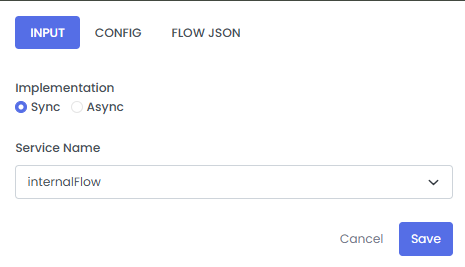
Asynchronous (Async) Implementation
When Async is selected, the internal service will be executed in the background, and the current flow will continue its execution without waiting for the internal service to finish. This mode is ideal for non-blocking operations, such as logging, notifications, or long-running tasks that do not immediately impact the current flow's progression.
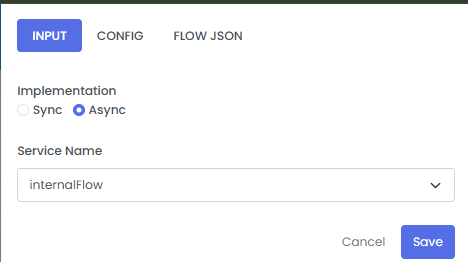
2. Service Name
This parameter specifies which internal service to invoke. The dropdown list will populate with all available internal trigger services configured within your project.
| Fields | Description | Example |
|---|---|---|
| Implementation | Selects the execution mode for the internal service call: Sync (waits for completion) or Async (runs in background). | Sync |
| Service Name | The name of the internal trigger service to be executed. This field is mandatory and populated from available internal services. | internalFlow |
Video Guide: Internal Component Configuration
This video demonstrates the end-to-end configuration of the Internal Component. It illustrates how to identify an internal trigger service (e.g., internalFlow) on the services page, and then integrate it into another service (e.g., callInternal rest trigger service). The video specifically highlights the steps to drag the Internal Component from the component tab, right-click to configure its synchronous implementation, and select the desired internalFlow service from the dropdown menu.